Governed analytics distribution for Power BI

Your BI platform builds the analytics. DataCentral governs how they reach everyone else.

A control plane on top of Power BI. Authenticate any audience, resolve exactly what each user may see, and deliver reports, dashboards and data apps to employees, customers and partners — in a branded portal, inside your own product, or on any screen.

Microsoft Solutions Partner · Available on Azure Marketplace

  • Finance Power BI workspace
  • Operations Power BI workspace
  • Sales model Semantic model · RLS
  • Field ops app Data app · writeback
DataCentral control plane
  1. authenticate Entra ID · Mobile ID · OTP · User Pass
  2. resolve OU → roles → row-level security
  3. deliver embed token · report key · API
  4. audit every view logged
  • Employees Entra ID single sign-on
  • Partners Mobile ID · User Pass
  • Customers Branded portal
  • Your product Embedding API
  • Screens Report key, no login

Trusted by organizations whose data sharing is regulated, audited and public

  • Isavia
  • Landsnet
  • Hagar
  • Blue Lagoon
  • Sjóvá
  • Play
  • Húsasmiðjan
  • Origo
  • Veður (Icelandic Met Office)
  • Rarik
  • Keflavík Airport
  • Inkasso

The problem

The analytics already exist. Getting them to the right people is where BI programs stall.

Power BI solves building and sharing inside your tenant. Everything around it — external users, licensing, portals, per-customer security, proof of who saw what — is left to custom work.

External users
Customers, distributors, regulators and auditors need Power BI Pro licenses or guest accounts in your corporate directory. Both cost money, and both widen your identity perimeter.
Row-level security at scale
One report, fifty audiences: static RLS turns into dozens of roles to author, assign and test in Power BI Desktop — and nobody can say with confidence who sees which rows.
Every portal is a project
Each customer-facing dashboard becomes its own web application, with its own login, branding, embed code and release cycle.
No single answer to “who saw what?”
Usage sits in Power BI, identities in Entra ID, links in email threads. The audit trail is assembled by hand — if at all.


What DataCentral is

One control plane between your Power BI estate and every audience.

DataCentral does not replace Power BI, your warehouse or Entra ID. It governs the last mile: who can sign in, what each person may see, how content is delivered, and what gets logged. Your data stays where it is.

  • 4 sign-in methods Entra ID, User Pass, Mobile ID, OTP — enabled per tenant
  • 3 role layers System, report and row-level security, assigned to organizational units
  • 0 rows of your data stored Only users, roles, workspace and report IDs, and the audit log
  • 20+ organizations Aviation, energy, retail, insurance, finance and the public sector

Platform

Everything around the report, governed in one place.

Four capabilities, one console. Each is configured per tenant, so a business unit, a partner programme and an ISV customer can run side by side on the same instance with nothing in common but the policy you set.

Authenticate

Any audience, one identity surface

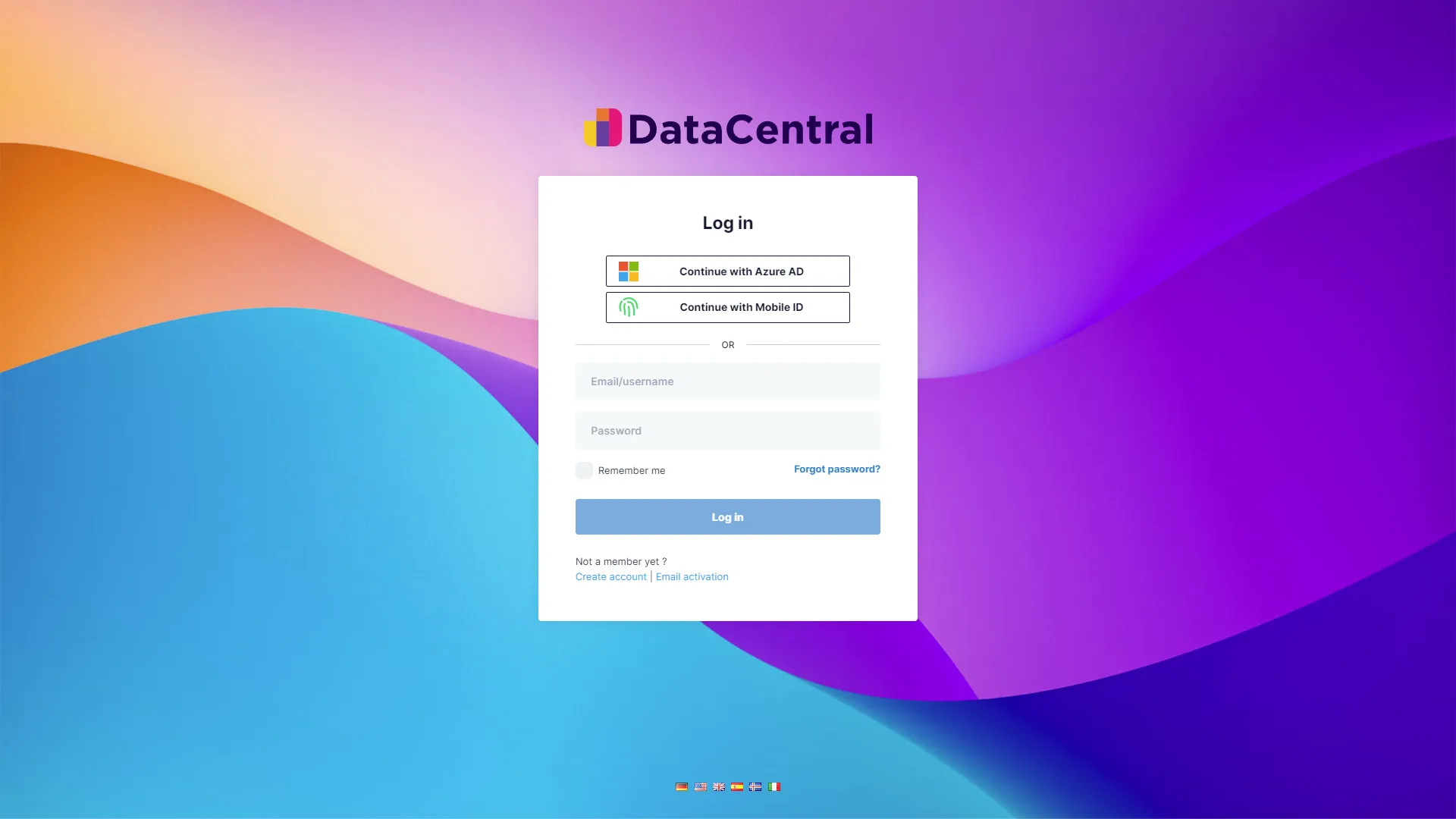
Employees sign in with Entra ID and inherit your conditional-access and MFA policies. Partners and customers get User Pass, Mobile ID or one-time passcodes — accounts that live in DataCentral, not in your corporate directory.

  • Entra ID, User Pass, Mobile ID and OTP, enabled per tenant
  • White-label per tenant: logo, colours, own subdomain
  • Microsoft Graph sync keeps users and groups current
How authentication works
DataCentral tenant login page offering Continue with Azure AD, Continue with Mobile ID, and email and password sign-in

Authorize

Roles attached to organizational units, not to people

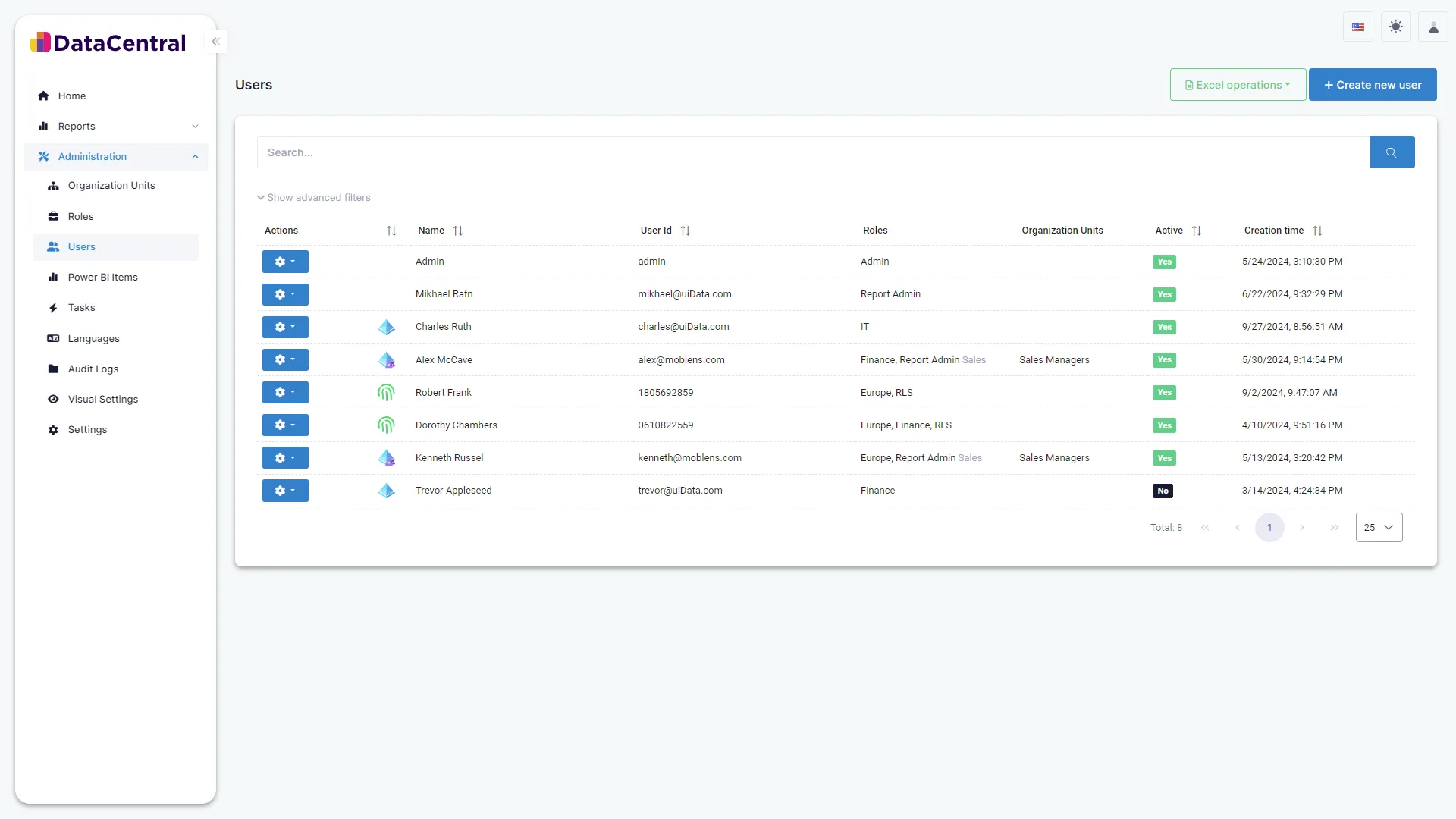
Map Entra ID groups to organizational units and assign report roles and RLS roles to the unit. When someone joins, moves or leaves, access follows — and Smart RLS lets one dynamic role carry many roles, so you stop authoring a Power BI role per audience.

  • System, report and RLS roles — three separate layers
  • Organizational units synced from Entra ID security groups
  • Smart RLS: many roles in one dynamic role, without hundreds of Power BI roles
Roles and permissions
DataCentral administration console showing the Users table with roles, organizational units, active status and creation time

Distribute

Deliver to a portal, your product, or a screen

Reports render in the branded DataCentral portal, inside your own application through the Embedding API, as a report key on a lobby screen, or as a scheduled slideshow — each with the viewer’s RLS applied and every view logged.

  • Branded portal per tenant, on your domain
  • Embedding API for ISVs and customer portals — App-owns-data, no Microsoft login for your users
  • Report keys, slideshows, export and DAX query links — all expiring, all revocable
Embedding API reference
embed.ts · server side
// 1. Your backend asks DataCentral for an encrypted key
POST https://api.{instance}.datacentral.ai/api/services/app/ItemLinks/CreateEncryptedKey
{
  "value": { "userId": "anna.b@northstar.example",
             "reportId": 12345,
             "roleNames": ["Region_EMEA"],
             "expiration": "2026-09-01T13:30:00Z" },
  "tenancyName": "northstar", "passPhrase": "••••••"
}
// → { "result": { "key": "eyJhbGciOi…" } }

// 2. Your frontend renders the report with the user's RLS applied
<iframe src="https://northstar.datacentral.ai/report/12345?ev={key}">

Operate

License pooling, automation, and an audit trail you can hand to compliance

A pooled Power BI service principal serves viewers who hold no Pro license of their own, so audience size is decoupled from seat count. Action tasks add writeback and context triggers — turning reports into apps. Every login, view, export and role change lands in the audit log.

  • Service-principal pooling: audience size decoupled from licenses
  • Action tasks: writeback and context triggers from inside reports
  • Audit-log export for compliance evidence (SOC 2, GDPR requests)
Audit logs
Audit log Control-plane events · last 24 hours
TimeEventDetailStatus
09:41:12Z report.view Quarterly close · anna.b@northstar.examplerls=Region_EMEA ok
09:40:58Z login Entra ID · anna.b@northstar.exampleou=finance-eu ok
08:15:03Z key.created rk_8f3a21 · Field ops dailyexpires=24h active
02:00:00Z group.sync Entra ID groups → 4 OUs · 112 membersnightly ok
yesterday access.suspended contractor-pool OU · 9 usersby tenant admin suspended
yesterday export.pdf Supplier scorecard · m.larsen@partner.examplerls=Supplier_07 ok

Illustrative data

How it works

Four stages between a sign-in and a rendered report.

DataCentral is a governed proxy between your data sources and your audiences. It handles authentication, authorization and the rendering of reports in a white-labeled interface — and stores only the metadata required to do so.

  1. 01

    Authenticate

    You configure
    Choose the sign-in methods each tenant allows: Entra ID, User Pass, Mobile ID, OTP.
    DataCentral does
    Verifies the identity, applies your Entra conditional-access policies where used, and starts an audited session.
  2. 02

    Resolve

    You configure
    Map Entra ID groups to organizational units; assign report roles and RLS roles to OUs, not to people.
    DataCentral does
    Resolves the user’s OUs, report roles and row-level-security roles — including Smart RLS, which passes many roles into one dynamic role.
  3. 03

    Deliver

    You configure
    Import reports from connected workspaces; decide how each audience receives them: portal, report key, embed, slideshow.
    DataCentral does
    Requests a time-limited embed token from Power BI through the right service principal and renders the report with the resolved RLS.
  4. 04

    Audit

    You configure
    Review the audit log, set link expirations, rotate secrets.
    DataCentral does
    Logs every login, view, export and role change; expiring links and keys revoke themselves.
  • Your data never moves

    Raw data stays in Power BI and your warehouse. DataCentral references items; it does not copy them.

  • Host and tenant isolation

    One instance, many tenants — each with its own subdomain, users, organizational units, roles and branding. A user in tenant A cannot see tenant B.

  • Time-limited tokens

    Every render uses a short-lived Power BI embed token carrying the user’s row-level security. Links and keys expire on the schedule you set.

Built for Power BI

Native to the Microsoft stack you already run.

Your analysts keep building in Power BI Desktop. Your identity team keeps Entra ID as the source of truth. DataCentral plugs into both through the same service principals and APIs Microsoft provides — nothing proprietary in the data path.

  • Microsoft Entra ID

    Single sign-on, your conditional-access and MFA policies, security groups synced to organizational units.

  • Power BI service principals

    App-owns-data embedding through a pooled principal — viewers need no Pro license of their own.

  • Row-level security

    Static roles, dynamic USERPRINCIPALNAME() rules, and Smart RLS that carries many roles in one dynamic role.

  • Microsoft Graph

    Directory synchronisation between Entra ID and your tenant — SCIM-style, on your own app registration.

  • Microsoft Azure

    Hosted on Azure and sold through Azure Marketplace; self-hosted instances on your own domain for enterprise.

  • Reports, dashboards, apps, models

    Import items from connected workspaces; semantic models stay where they are, DataCentral holds only references.

Security

Governed by design, not by convention.

Security in DataCentral is structural: identities are verified by the provider you trust, access is resolved from organizational units, and data is filtered at render time. Nothing depends on people remembering to share carefully.

Security overview
Identity
Entra ID with your conditional-access and MFA policies for employees. Unused sign-in methods can be disabled per tenant to shrink the attack surface.
Least privilege
Roles attach to organizational units synced from Entra ID groups; when someone moves or leaves, access follows automatically. Tenant admins are few by design.
Data boundary
Raw data never leaves Power BI or your warehouse. DataCentral stores the metadata needed to enforce access — users, roles, item references — and the audit log.
Every render, every link
Reports render through short-lived Power BI embed tokens carrying the user’s RLS. Item links and embed keys carry expirations and can be revoked at any time.

Customers

Trusted where data sharing is regulated, audited and public.

Airports, grid operators, insurers, retailers and public bodies use DataCentral to put governed analytics in front of partners, regulators and their own people.

DataCentral's real-time, secure sharing of critical operational data is a major step forward in overcoming challenges in data sharing for our airport community and regulatory partners.

Isavia logo
Guðmundur Karl Gautason Business Insight & Customer Excellence, Isavia

DataCentral provides us with unparalleled functionality in data management, allowing secure and user-friendly access to external users while maintaining full control over our data.

Landsnet logo
Jóhannes Þorleiksson Executive VP of IT and Intelligence, Landsnet

See who uses DataCentral

Partners

Delivered with the data and AI consultancies you already work with.

Our partners lay the foundation — architecture, engineering, strategy. DataCentral is the layer on top that distributes the result securely. How we work with partners.

  • Maven
  • Expectus
  • Sensa

See governed distribution running on your own Power BI content.

A 30-minute session: we connect a sample of your reports, model one internal and one external audience, and show the result end to end — not a slide deck.